RUST
Free and nulled Rust plugins and server resources including premium leaked tools, gameplay systems and admin plugins. Download trusted Rust resources to customize and optimize your Rust server
6 files
-
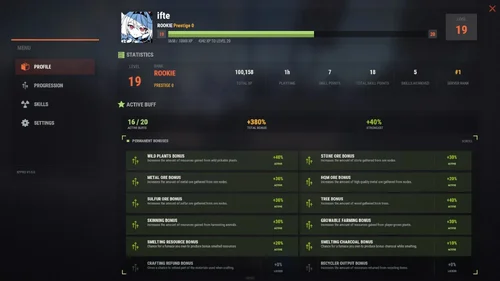
About XP Pro - Level UP, Progression, Skills & Abilities
depends on:
Required files or plugins needed for this resource to work properly.
Image LibraryRequired
Custom Vitals ManagerRequired
🗃️Configuration
Hide contents
🗃️ Lang
Hide contents
✨XP Keys
Hide contents
⚡Permanent Buffs
Hide contents
🎓Skills
Hide contents
🍀Ability
Hide contents
🌐XPPro Editor
- Edit the levels, rewards, skills abilities using the website (https://xppro-editor.vercel.app/)
⚙️Languages
- Right now I have already translated files you can download and use: German, Spanish, French, Brazilian Portuguese, Russian, Simplified Chinese
Translation.zip- 9 Downloads
Updated -
Official page:
Map Voter and Auto wipe script
🎯 What is MapVoter? MapVoter is a comprehensive Rust server management plugin that automates the entire wipe cycle - from map generation and community voting to server restarts and updates. Let your players choose the next map while you enjoy fully automated server maintenance. Perfect for: - ✅ C...
About Map Voter and Auto Wipe Script
What is MapVoter?
MapVoter is a comprehensive Rust server management plugin that automates the entire wipe cycle - from map generation and community voting to server restarts and updates. Let your players choose the next map while you enjoy fully automated server maintenance.
Perfect for:
- Community servers wanting player engagement
- Server owners seeking automation
- Admins tired of manual wipe management
- Servers with regular wipe schedules
Key Features
Map Voting System
- In-Game UI Voting - Interface for players to vote
- Discord Integration - Vote directly from your Discord server
- Multiple Map Sources - Generate random maps, use RustMaps.com filters, or create custom maps
- Duplicate Vote Prevention - Optional Discord authentication to prevent vote manipulation
Fully Automated Wipe Management
- Scheduled Auto-Wipes - Set your wipe schedule (weekly, bi-weekly, monthly)
- Forced Wipe Support - Automatically handles Rust's monthly forced wipes
- Custom Wipe Cycles - Define your own map/BP wipe schedules
- Countdown Timers - Players see exactly when the wipe occurs
- Pre-Wipe Voting - Start votes X days before wipe for maximum participation
Flexible Map Generation
- Procedural Maps - Generate random maps with custom seeds
- RustMaps.com Integration - Select from thousands of pre-made maps
- Filter Support - Use RustMaps filter IDs to match your server style (staging, etc.)
- Custom Map URLs** - Use your own map files or RustMaps premium maps
- Auto-Generate Custom Maps - Subscribers can auto-generate maps every wipe
UI Design
- In-Game Interface - Clean voting and admin menus
- Admin Dashboard - Settings GUI for easy configuration
Fun Kit System
- Pre-Wipe Events - Enable fun kits before wipe to keep players engaged
- Automatic Activation - Triggers X minutes before wipe
- Blueprint Lock - Prevents BP farming during fun kit period
- Kits Plugin Integration - Works with your existing kit setups
Discord Bot Integration
- Vote Embeds- Discord embeds showing all map options
- Command Support - Admin control from Discord
- Role-Based Permissions - Restrict commands by Discord roles
- Multi-Channel Support - Configure different channels for different commands
- Embed Customization - Add your branding with custom avatars and footers
Server Automation
- Auto-Updates - Automatically updates server and Oxide
- File Cleanup - Selectively delete plugin data on wipe
- Server.cfg Management - Automatically updates map seed/size/URL
Advanced Configuration
- In-Game Settings Editor - Change settings without editing files
- Granular Control - Configure every aspect of voting and wiping
- Permission System - Control who can vote and manage
- Debug Logging - Track auto-wipe progress for troubleshooting
- Server Identity Support - Works with multi-server setups
Required Plugins:
- image-library - For displaying map thumbnails
- Wipe Info API - For wipe schedule detection
- Discord Extension - For Discord integration
Server Requirements:
- Windows Dedicated Server, Ubuntu, Pterodactyl Panel, or Open Game Panel
- Administrator privileges for server management
- Standard server structure with `server.cfg` in `/server/{identity}/cfg/`
- Ability to edit server startup command
Optional:
- Kits Plugin - For fun kit feature
- Server Rewards - For vote rewards
- RustMaps Account - For premium map features
Quick Start Guide
1. Installation
1. Upload MapVoter.cs to /oxide/plugins/
2. Install required dependencies (Image Library, WipeInfoApi, Discord Extension)
3. Restart server to generate configuration file
2. Basic Configuration
Configuration Guide
1. Set your wipe schedule in config (e.g., every 7, 14, 21, 28 days)
2. Configure Discord bot token and channel IDs
3. Set your RustMaps API key (optional)
4. Define your server identity in config
3. Server.cfg Setup
Create/edit your `server.cfg` file in `/server/{identity}/cfg/`:
server.port 28000
server.seed
server.worldsize
server.maxplayers 100
server.hostname "Your Server Name"
server.level "Procedural Map"
4. Test Run
1. Type /mvote in-game to open the menu
2. Generate some test maps
3. Try voting and check results
4. Verify server.cfg updates correctly
Commands
Player Commands
/mvote - Opens the main voting UI
Permission: MapVoter.vote
/voteresult - Shows current vote results
Permission: MapVoter.vote
Admin Commands (In-Game)
/mvote - Opens admin dashboard
Permission: MapVoter.Manager
/startvote - Starts voting after selecting maps
Permission: MapVoter.use
MapVoter.generate <count> <seed> <duration> - Generate maps and start vote
Permission: MapVoter.use
MapVoter.mapwipe <delay> <size> - Wipe map with new size
Permission: MapVoter.use
MapVoter.mapwipe <delay> <url> - Wipe with custom map URL
Permission: MapVoter.use
MapVoter.bpwipe <delay> <size> - Wipe map and blueprints
Permission: MapVoter.use
MapVoter.bpwipe <delay> <url> - BP wipe with custom map
Permission: MapVoter.use
MapVoter.cancelwipe - Cancel ongoing wipe countdown
Permission: MapVoter.use
MapVoter.stopvoting - Stop current vote
Permission: MapVoter.use
MapVoter.update <delay> - Update server and Oxide
Permission: MapVoter.use
MapVoter.cancelupdate - Cancel update countdown
Permission: MapVoter.use
MapVoter.reload - Reload plugin configuration
Permission: MapVoter.use
Discord Commands
!vote - Show current vote options
!generate <count> <seed> <duration> - Generate and start vote
!mapwipe <delay> <size> - Trigger map wipe
!bpwipe <delay> <size> - Trigger BP wipe
!cancelwipe - Cancel wipe
!stopvoting - Stop voting
!update <delay> - Update server
!cancelupdate - Cancel update
Permissions
MapVoter.vote - Allows players to vote on maps
MapVoter.use - Basic admin functions (generate, start vote)
MapVoter.Manager - Full admin access to all features
Configuration Overview
Auto Vote System:
• Enable/disable auto-voting
• Set days before wipe to start vote
• Define vote start time (24-hour format)
• Number of maps to generate
Auto Wipe System:
• Enable/disable auto-wipe
• Map wipe schedule (e.g., days 7, 14, 21, 28)
• BP wipe schedule (e.g., day 0 = forced wipe)
• Custom wipe times
• Forced wipe handling
RustMaps Integration:
• API key configuration
• Filter ID support
• Staging/barren preferences
• Search depth (pages per request)
Discord Configuration:
• Bot token
• Channel IDs (voting, logs)
• Command prefix
• Role-based permissions
• Avatar and footer customization
Data Cleanup:
• Plugin data files to delete on wipe
• Separate lists for forced wipe and map wipe
Common Use Cases
Weekly Wipe Server
"Map Wipe schedule": [7],
"BP Wipe schedule": [0],
"Start voting x days before wipe": 2
Maps wipe every 7 days, BPs wipe on forced wipe, voting starts 2 days early.
Bi-Weekly with Community Choice
"Map Wipe schedule": [14],
"BP Wipe schedule": [0, 14],
"Number of maps to generate": 6
Wipes every 14 days, BPs wipe twice (forced + bi-weekly), 6 map options.
Monthly with RustMaps
"Map Wipe schedule": [28],
"Select random maps from rustmaps filter id": true,
"filter Id": "your_filter_id"
Monthly wipe using curated RustMaps with your preferred settings.
Troubleshooting
Vote Not Starting Automatically?
• Check WipeInfoApi is loaded
• Verify wipe schedule matches your server
• Ensure "Auto start vote" is enabled
• Check console for errors
Server Not Wiping?
• Verify server.cfg path in config
• Check server identity matches
• Enable debug mode for detailed logs
• Test with manual wipe command first
Discord Bot Not Working?
• Verify bot token is correct
• Check channel IDs are valid
• Ensure bot has proper permissions
• Verify Discord Extension is installed
Maps Not Generating?
• Check RustMaps API key (if using filters)
• Verify Image Library is loaded
• Test with procedural generation first
• Check filter ID is valid
Best Practices
For Server Owners:
1. Test First - Run dry-run commands with no players online
2. Backup Regularly - Always backup before major wipes
3. Communicate - Use Discord to inform players of wipe schedule
4. Monitor Logs - Enable debug mode during first few wipes
5. Update Dependencies - Keep Image Library and WipeInfoApi current
For Players:
1. Vote Early - Don't wait until the last minute
2. Check Discord - Vote announcements posted there
3. Review Maps - Look at thumbnails before voting
4. Follow Rules - One vote per person (if authentication enabled)
Bonus Features
Fun Kit System
Keep players engaged before wipe with special kits:
• Pre-wipe PvP events
• Testing new builds
• Practice raids
• Community fun
Server Rewards Integration
Reward players for voting:
• Give reward points per vote
• Encourage participation
• Build community engagement
Multi-Server Support
Run multiple servers with one plugin:
• Server identity configuration
• Independent wipe schedules
• Shared Discord bot- 0 Downloads
Submitted -
DEPENDS ON
Npc Spawn
WORKS WITH
Frostland
About Armored Train
The New Year is coming and I have prepared for you a new preset customization for the train!After installing the update, customization will be automatically applied to all cars in the configuration of the armored train. To disable this, make the "Customization preset" parameter empty in the config.
You can also disable the customization of certain wagons or change the customization of the NPCs in the file oxide/data/ArmoredTrain/NewYear
New Year's map from the video:
This plugin will add an armored train to your server, which can travel both in the subway and by rail.
It can consist of any number of wagons. A helicopter can accompany it.
Bradley, npc, turrets, simsites can be installed on the train.
The plugin allows you to create any number of train presets, for which the order of wagons, the helicopter preset, the probability of spawn and the duration of patrolling can be specified. Each wagon or locomotive can be configured separately. Any speed can be set by the locomotive.If there is no spawn of trains on the surface on your custom map, read the section “Custom spawn points”
Caboose
By default, one of the presets of the train is a locomotive and a caboose. This train does not attack players first and there is no loot on it. It is intended only for players to travel around the map.
You can add a caboose wagon to any other train, or create your own galley train with any number and any set of wagons.
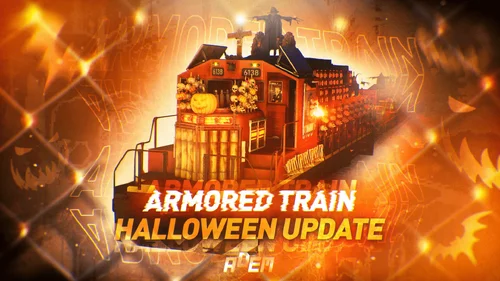
Halloween Update
Have you already prepared your server for Halloween?
On the eve of the Halloween Rust update, I have prepared for customization of all armored train cars.
After installing the update, customization will be automatically applied to all cars in the configuration of the armored train. To disable this, make the "Customization preset" parameter empty in the config.
Custom spawn points
If you are using a custom map in which there are no spawn trains on the surface, but there is a railway, then for the train to work on the surface, you need to add custom spawn points of the train.
Instruction:
Stand at the point where you want the train to spawn
Enter the command /atrainpoint
If you receive a message that a point has been created, enable “Use custom spawn coordinates [true/false]” in config
For correct operation, it is recommended to create several spawn points of the train
Chat commands (only for administrators)
/atrainstart– launches the event in a random configuration
/atrainstartunderground - forcibly launches an event underground
/atrainstartaboveground - forcibly launches an event aboveground
/atrainstart <trainPresetName> – launches the event in the <trainPresetName> configuration
/atrainstartunderground <trainPresetName>
/atrainstartaboveground <trainPresetName>
/atrainstop– stops the event
/atrainpoint– creates a custom spawn point of the train in your position
Console commands (RCON only)
atrainstart– launches the event in a random configuration
atrainstartunderground - forcibly launches an event underground
atrainstartaboveground - forcibly launches an event aboveground
atrainstart <trainPresetName> – launches the event in the <trainPresetName> configuration
atrainstartunderground <trainPresetName>
atrainstartaboveground <trainPresetName>
atrainstop – stops the event
Config
en – example of plugin configuration in English
ru – example of plugin configuration in Russian
Dependencies (optional, not required)
True PVE
PveMode
GUI Announcements
Notify
DiscordMessages
AlphaLoot
CustomLoot
Economics
Server Rewards
IQEconomic
Api
bool IsArmoredTrainActive()
bool StopArmoredTrain()
bool StartArmoredTrainEvent()
bool EndArmoredTrainEvent()
bool IsTrainBradley(uint netID)
bool IsTrainHeli(uint netID)
bool IsTrainCrate(uint netID)
bool IsTrainSamSite(uint netID)
bool IsTrainWagon(uint netID)
bool IsTrainTurret(uint netID)
Vector3 ArmoredTrainLocomotivePosition()
Hooks
OnArmoredTrainEventStart
OnArmoredTrainEventStop
- 0 Downloads
Submitted -
About Kong: Skull Island
A stunning island full of dangers and fantastic places. The map was created based on the movie Kong: Skull Island.
Immerse yourself in the world of Skull Island and feel like a hero of a movie of an entire era about an amazing big, kind and strong monkey named Kong.
Map size 4096.
The terrain of the map was repeated along the coastline from the movie poster. Created with World Creator.
And also the map is ideal for pvp and pve servers.
Have questions? See the FAQ (Read me) file.
Need help? Connect to our discord: click me
This map is constantly supported and updated for the current version of the game with all updates!
Features:
About 67409 prefabs
Map size 4096
Optimal FPS
9 custom locations with loot
Over 21 custom locations for building
Over 5 new unique building locations
Сustom locations where you can build are marked with "X”
All custom locations have names on the map
Compatible with Raidable Bases plugin
Custom configuration of BetterNpc for the map is set up
Custom monuments:
Lake Hank Marlowe (large location)
Shrine of reflection (large location)
Big Camp (large location)
Tribal Village (medium location)
King Kong Tomb (medium location)
Fantasy Forest (medium location - loot + build)
King Kong Swamp (medium location - loot + build)
Volcano (medium location)
Custom Mining outpost (small location + build)
And many others that don't have a name
5 unique types of places to build
Over 21 custom locations for building
Monuments:
Ferry Terminal
Nuclear Missile Silo
Arctic Research Base
Abandoned Military Base
Harbor
Giant Excavator
Lighthouse
Large Fishing Village
Fishing Village
Small Fishing Village
OilRig Small
OilRig Large
Train Tunnel
Underwater Labs
Launch Site
Ranch
Outpost
Military tunnel
Power Plant
Bandit camp
Satellite Dish
Sphere
Junkyard
Metro
Mining outpost
Gas station
Supermarket
Oxide.Ext.RustEdit.dll FAQ (Read me).txt- 0 Downloads
Submitted -
Works with
Compatible add-ons, packages, or tools that pair well with this resource.
Simple Loot TableOptional
NotifyOptional
KitsOptional
NTeleportationOptional
ClansOptional
Show More (2)
About Airfield Event
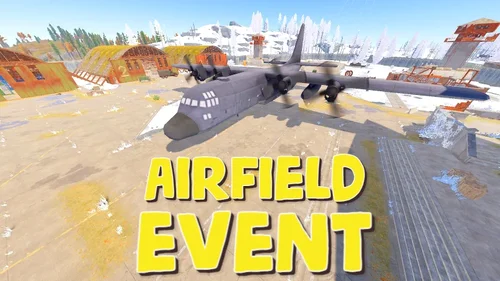
Adds an airfield event to your server! A cargo plane lands on the airfield and drops airdrops, boxes. Strong NPCs, Bradley and a patrol helicopter will protect the crates
You can also set up custom loot using the "SimpleLootTable" plugin
Features:
Easy to set up. Excellent customization options in the config
Commands(admin only):
afestart - force the event to start
afestart {steamID/name} - the event will be reserved for one player
afefast - quick landing of a cargo plane, for testing settings
afefast {steamID/name} - quick landing of a cargo plane, the event will be reserved for one player
afestop - cause the event to end
afe_addcustom - adds a custom landing place for a cargo plane. You must stand on level ground and look in the direction where the cargo plane will move(do not forget to set in the config file "Use a custom place to land a cargo plane": true)
Hooks:
void AirfieldEventStarted() - called when the event starts
void AirfieldEventEnded() - called when the event has ended
AirfieldEventWinner(BasePlayer player) - called at the end of the event, returns the event winner
AirfieldEvent config:
{ "PVE mode (crates can only be looted by the player who first dealt damage to the NPC)": false, "Time after which the owner of the event will be deleted if he left the dome or left the server (for PVE mode)": 300, "Give event ownership to the owner's teammates if he is no longer the owner. Only if teammates are within the event radius (for PVE mode)": true, "Radius for event(for PVE mode)": 380, "Create a dome for PVE mode": false, "Dome transparency (the higher the value, the darker the dome, recommended 4)": 4, "Dome offset": { "x": 0.0, "y": 0.0, "z": 30.0 }, "Do not allow other players into the event(only for PVE mode if there is a dome)": false, "Allow admin to be in event dome (only for PVE mode if there is a dome)": true, "Triggering an event by timer (disable if you want to trigger the event only manually)": true, "Minimum time to event start(in seconds)": 3600, "Maximum time to event start(in seconds)": 7200, "Event duration(In seconds. Time is calculated from the moment the cargo is dropped by the plane at the airfield)": 3600, "End the event early if all crates were completely looted and all NPCs were killed(including Bradley and Heli)": true, "Minimum number of online players to trigger an event": 1, "Minimum drops amount(minimum number of cargo spawns after plane landing, should not be less than 1)": 2, "Maximum drops amount(maximum number of cargo spawns after plane landing, should not be less than 1, maximum 10)": 4, "Minimum crates amount(spawn every cargo drop)": 1, "Maximum crates amount(spawn every cargo drop)": 1, "Crate simple loot table name(plugin SimpleLootTable is required)": "", "Minimum number of items in a crate(plugin SimpleLootTable is required)": 0, "Maximum number of items in a crate(plugin SimpleLootTable is required)": 0, "Remove crates after being looted by a player(in seconds)": 300, "Extend event duration if NPCs, Heli or Bradley is attacked (if less time left, extend to set time (in seconds))": 600, "Crates timer(in seconds)": 900, "Minimum airdrops amount(spawn every cargo drop)": 1, "Maximum airdrops amount(spawn every cargo drop)": 1, "Airdrop simple loot table name(plugin SimpleLootTable is required)": "", "Minimum number of items in an airdrop(plugin SimpleLootTable is required)": 0, "Maximum number of items in an airdrop(plugin SimpleLootTable is required)": 0, "Minimum NPCs amount(spawn every cargo drop)": 1, "Maximum NPCs amount(spawn every cargo drop)": 2, "NPCs type(NPCs prefab, experimental setting, it is not known how the NPCs will behave) 0 - tunneldweller; 1 - underwaterdweller; 2 - excavator; 3 - full_any; 4 - lr300; 5 - mp5; 6 - pistol; 7 - shotgun; 8 - heavy; 9 - junkpile_pistol; 10 - oilrig; 11 - patrol; 12 - peacekeeper; 13 - roam; 14 - roamtethered; 15 - bandit_guard; 16 - cargo; 17 - cargo_turret_any; 18 - cargo_turret_lr300; 19 - ch47_gunner": 8, "NPCs health(0 - default)": 0, "NPCs damage multiplier": 1.0, "NPCs accuracy(the lower the value, the more accurate, 0 - maximum accuracy)": 2.0, "NPCs attack range": 75.0, "Radius of chasing the player(NPCs will chase the player as soon as he comes closer than the specified radius, must be no greater than the attack range)": 60.0, "Minimum distance to NPC damage": 75.0, "Forcibly immobilize an NPC": false, "Method of distribution of kits for NPCs(1 - sequentially, 2 - repeating, 3 - randomly)": 1, "List of kits for NPC(requires Kits plugin)": [ "kit1", "kit2", "kit3" ], "Default displayName for NPC(for SimpleKillFeed/DeathNotes plugin)": "Airfield NPC", "List of displayNames for each NPC(for SimpleKillFeed/DeathNotes plugin)": [ "Airfield NPC1", "Airfield NPC2", "Airfield NPC3" ], "Chance of an NPC throwing a grenade(0-100%) Only if the NPC loses sight of the player, if the player is in a vehicle, if the player is trying to search crates": 50, "NPC grenade damage scale": 1.0, "Will the NPC take damage from a collision with a car": true, "Will NPCs attack zombies": true, "Remove NPC corpses": false, "Patrol helicopter spawn chance (0 - 100%)": 50, "Call the helicopter only after activating the hackable crate": false, "How long the helicopter will patrol the airfield (in minutes)": 5, "Helicopter damage multiplier": 1.0, "Helicopter health": 10000.0, "Helicopter main rotor health": 900.0, "Helicopter tail rotor health": 500.0, "The patrol helicopter will not patrol the airfield if it has found a target": true, "Spawns a helicopter right on the airfield(if false, then the helicopter will arrive from afar in a few seconds)": false, "Helicopter patrol range": 150, "Event marker on the map(will spawn a marker immediately after the start of the event)": false, "If true, spawn the marker only after the plane lands": true, "Event marker name": "Airfield event", "Display on the marker how much time is left until the end of the event": true, "Event marker transparency(0-1)": 0.75, "Event marker radius": 0.5, "Event marker color.R(0-1)": 1.0, "Event marker color.G(0-1)": 0.0, "Event marker color.B(0-1)": 0.0, "Use a custom place to land a cargo plane": false, "Custom place position": { "x": 0.0, "y": 0.0, "z": 0.0 }, "Custom place rotation": { "x": 0.0, "y": 0.0, "z": 0.0 }, "Use custom navmesh (enable if using custom airfield and getting NPC navmesh error)": false, "BradleyAPC spawn chance (0 - 100%) If you are not using a custom map, correct operation of BradleyAPC is not guaranteed. Use the default airfield or a landing spot that is similar to the default airfield": 50, "BradleyAPC bullet damage": 7.0, "BradleyAPC health": 1000.0, "Notification type for the Notify plugin (-1 does not use Notify)": -1, "Notice message type (0 or 1, -1 do not use notice messages)": -1, "SteamID for chat message icon": 0, "Number of points for the winner(only for ServerRewards plugin)": 0, "Number of skill points for the winner(only for Skill Tree plugin)": 0, "Drone Ban Radius (0 - not used)": 0.0, "Damage drones take when near an event(every 5 seconds)": 50.0 }- 1 Downloads
Updated -
depends on
Required files or plugins needed for this resource to work properly.
Npc SpawnRequired
About Harbor Event
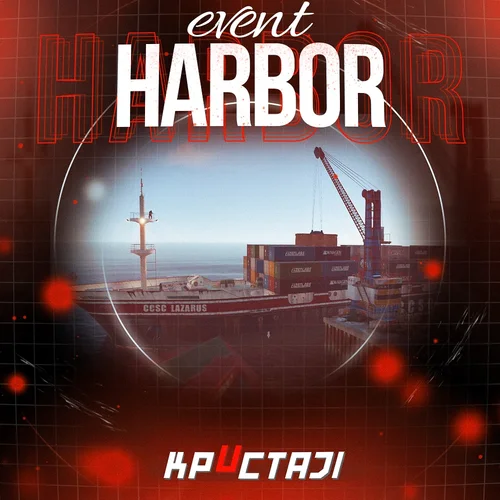
Creates a unique event at the Harbor monument for players to participate in for rewards. Players must battle numerous NPCs and APCs to access the puzzle to open the loot room!
Description
This event started off as a warning on the chatbox about the ships coming soon to dock in Port, loaded with precious cargo. After the period has passed, a ship appears in one of the locations at Harbour that are accessible from the map, where the crane loads the container.
The loading area is protected by one Tank and 7 NPCs by default. The container door is locked, you must push a button from inside the cranes cockpit to open the door. Inside the container, there is a default security camera, locked box, 2 DMS, 2 Elite, and 2 Military boxes.
The locations and loot from all crates/NPCs can be configured within configurations, and unwanted crates/NPCs added or removed. Also, ships will generate the default ship loot, e.g. The config file allows to modify tank as well as loot inside of the ship.
When the event occurs, the map displays the markers (configured in the config file). All players that are inside the event area will have a timer counting down the amount of time until the event ends.
Dependencies Required
NpcSpawn
Dependencies (optional, not required)
True PVE
PveMode
GUI Announcements
Notify
Discord Messages
AlphaLoot
CustomLoot
NTeleportation
HeliControl
Economics
Server Rewards
IQEconomic
Kits
Chat commands (only for administrators)
/harborstart – starting of the event
/harborstop – ending of the event
/harborpos – determining the position and rotation coordinates for changing the location of NPCs and crates.It should write in the configuration (Attention! The event must be started, the current position of the administrator in relation to the cargoship is read)
Console commands (RCON only)
harborstart – starting of the event
harborstop – ending of the event
Plugin Config
en - example of plugin configuration in English
ru - example of plugin configuration in Russian
Hooks
void OnHarborEventStart() – called when the event starts
void OnHarborEventEnd() – called when the event ends
void OnHarborEventWinner(ulong winnerId) – called at the end of the event, where the winnerId is the player who did more actions to complete the event- 0 Downloads
Submitted