
br0ky
Administrators
-
Joined
-
Last visited
Files posted by br0ky
-
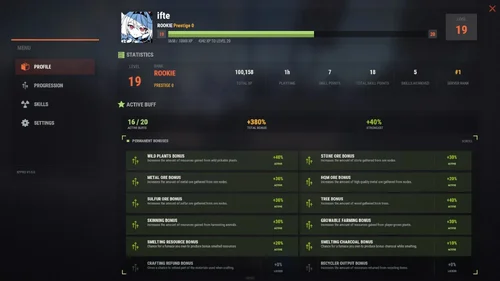
About XP Pro - Level UP, Progression, Skills & Abilities
depends on:
Required files or plugins needed for this resource to work properly.
Image LibraryRequired
Custom Vitals ManagerRequired
🗃️Configuration
Hide contents
🗃️ Lang
Hide contents
✨XP Keys
Hide contents
⚡Permanent Buffs
Hide contents
🎓Skills
Hide contents
🍀Ability
Hide contents
🌐XPPro Editor
- Edit the levels, rewards, skills abilities using the website (https://xppro-editor.vercel.app/)
⚙️Languages
- Right now I have already translated files you can download and use: German, Spanish, French, Brazilian Portuguese, Russian, Simplified Chinese
Translation.zip -
Official page:
Map Voter and Auto wipe script
🎯 What is MapVoter? MapVoter is a comprehensive Rust server management plugin that automates the entire wipe cycle - from map generation and community voting to server restarts and updates. Let your players choose the next map while you enjoy fully automated server maintenance. Perfect for: - ✅ C...
About Map Voter and Auto Wipe Script
What is MapVoter?
MapVoter is a comprehensive Rust server management plugin that automates the entire wipe cycle - from map generation and community voting to server restarts and updates. Let your players choose the next map while you enjoy fully automated server maintenance.
Perfect for:
- Community servers wanting player engagement
- Server owners seeking automation
- Admins tired of manual wipe management
- Servers with regular wipe schedules
Key Features
Map Voting System
- In-Game UI Voting - Interface for players to vote
- Discord Integration - Vote directly from your Discord server
- Multiple Map Sources - Generate random maps, use RustMaps.com filters, or create custom maps
- Duplicate Vote Prevention - Optional Discord authentication to prevent vote manipulation
Fully Automated Wipe Management
- Scheduled Auto-Wipes - Set your wipe schedule (weekly, bi-weekly, monthly)
- Forced Wipe Support - Automatically handles Rust's monthly forced wipes
- Custom Wipe Cycles - Define your own map/BP wipe schedules
- Countdown Timers - Players see exactly when the wipe occurs
- Pre-Wipe Voting - Start votes X days before wipe for maximum participation
Flexible Map Generation
- Procedural Maps - Generate random maps with custom seeds
- RustMaps.com Integration - Select from thousands of pre-made maps
- Filter Support - Use RustMaps filter IDs to match your server style (staging, etc.)
- Custom Map URLs** - Use your own map files or RustMaps premium maps
- Auto-Generate Custom Maps - Subscribers can auto-generate maps every wipe
UI Design
- In-Game Interface - Clean voting and admin menus
- Admin Dashboard - Settings GUI for easy configuration
Fun Kit System
- Pre-Wipe Events - Enable fun kits before wipe to keep players engaged
- Automatic Activation - Triggers X minutes before wipe
- Blueprint Lock - Prevents BP farming during fun kit period
- Kits Plugin Integration - Works with your existing kit setups
Discord Bot Integration
- Vote Embeds- Discord embeds showing all map options
- Command Support - Admin control from Discord
- Role-Based Permissions - Restrict commands by Discord roles
- Multi-Channel Support - Configure different channels for different commands
- Embed Customization - Add your branding with custom avatars and footers
Server Automation
- Auto-Updates - Automatically updates server and Oxide
- File Cleanup - Selectively delete plugin data on wipe
- Server.cfg Management - Automatically updates map seed/size/URL
Advanced Configuration
- In-Game Settings Editor - Change settings without editing files
- Granular Control - Configure every aspect of voting and wiping
- Permission System - Control who can vote and manage
- Debug Logging - Track auto-wipe progress for troubleshooting
- Server Identity Support - Works with multi-server setups
Required Plugins:
- image-library - For displaying map thumbnails
- Wipe Info API - For wipe schedule detection
- Discord Extension - For Discord integration
Server Requirements:
- Windows Dedicated Server, Ubuntu, Pterodactyl Panel, or Open Game Panel
- Administrator privileges for server management
- Standard server structure with `server.cfg` in `/server/{identity}/cfg/`
- Ability to edit server startup command
Optional:
- Kits Plugin - For fun kit feature
- Server Rewards - For vote rewards
- RustMaps Account - For premium map features
Quick Start Guide
1. Installation
1. Upload MapVoter.cs to /oxide/plugins/
2. Install required dependencies (Image Library, WipeInfoApi, Discord Extension)
3. Restart server to generate configuration file
2. Basic Configuration
Configuration Guide
1. Set your wipe schedule in config (e.g., every 7, 14, 21, 28 days)
2. Configure Discord bot token and channel IDs
3. Set your RustMaps API key (optional)
4. Define your server identity in config
3. Server.cfg Setup
Create/edit your `server.cfg` file in `/server/{identity}/cfg/`:
server.port 28000
server.seed
server.worldsize
server.maxplayers 100
server.hostname "Your Server Name"
server.level "Procedural Map"
4. Test Run
1. Type /mvote in-game to open the menu
2. Generate some test maps
3. Try voting and check results
4. Verify server.cfg updates correctly
Commands
Player Commands
/mvote - Opens the main voting UI
Permission: MapVoter.vote
/voteresult - Shows current vote results
Permission: MapVoter.vote
Admin Commands (In-Game)
/mvote - Opens admin dashboard
Permission: MapVoter.Manager
/startvote - Starts voting after selecting maps
Permission: MapVoter.use
MapVoter.generate <count> <seed> <duration> - Generate maps and start vote
Permission: MapVoter.use
MapVoter.mapwipe <delay> <size> - Wipe map with new size
Permission: MapVoter.use
MapVoter.mapwipe <delay> <url> - Wipe with custom map URL
Permission: MapVoter.use
MapVoter.bpwipe <delay> <size> - Wipe map and blueprints
Permission: MapVoter.use
MapVoter.bpwipe <delay> <url> - BP wipe with custom map
Permission: MapVoter.use
MapVoter.cancelwipe - Cancel ongoing wipe countdown
Permission: MapVoter.use
MapVoter.stopvoting - Stop current vote
Permission: MapVoter.use
MapVoter.update <delay> - Update server and Oxide
Permission: MapVoter.use
MapVoter.cancelupdate - Cancel update countdown
Permission: MapVoter.use
MapVoter.reload - Reload plugin configuration
Permission: MapVoter.use
Discord Commands
!vote - Show current vote options
!generate <count> <seed> <duration> - Generate and start vote
!mapwipe <delay> <size> - Trigger map wipe
!bpwipe <delay> <size> - Trigger BP wipe
!cancelwipe - Cancel wipe
!stopvoting - Stop voting
!update <delay> - Update server
!cancelupdate - Cancel update
Permissions
MapVoter.vote - Allows players to vote on maps
MapVoter.use - Basic admin functions (generate, start vote)
MapVoter.Manager - Full admin access to all features
Configuration Overview
Auto Vote System:
• Enable/disable auto-voting
• Set days before wipe to start vote
• Define vote start time (24-hour format)
• Number of maps to generate
Auto Wipe System:
• Enable/disable auto-wipe
• Map wipe schedule (e.g., days 7, 14, 21, 28)
• BP wipe schedule (e.g., day 0 = forced wipe)
• Custom wipe times
• Forced wipe handling
RustMaps Integration:
• API key configuration
• Filter ID support
• Staging/barren preferences
• Search depth (pages per request)
Discord Configuration:
• Bot token
• Channel IDs (voting, logs)
• Command prefix
• Role-based permissions
• Avatar and footer customization
Data Cleanup:
• Plugin data files to delete on wipe
• Separate lists for forced wipe and map wipe
Common Use Cases
Weekly Wipe Server
"Map Wipe schedule": [7],
"BP Wipe schedule": [0],
"Start voting x days before wipe": 2
Maps wipe every 7 days, BPs wipe on forced wipe, voting starts 2 days early.
Bi-Weekly with Community Choice
"Map Wipe schedule": [14],
"BP Wipe schedule": [0, 14],
"Number of maps to generate": 6
Wipes every 14 days, BPs wipe twice (forced + bi-weekly), 6 map options.
Monthly with RustMaps
"Map Wipe schedule": [28],
"Select random maps from rustmaps filter id": true,
"filter Id": "your_filter_id"
Monthly wipe using curated RustMaps with your preferred settings.
Troubleshooting
Vote Not Starting Automatically?
• Check WipeInfoApi is loaded
• Verify wipe schedule matches your server
• Ensure "Auto start vote" is enabled
• Check console for errors
Server Not Wiping?
• Verify server.cfg path in config
• Check server identity matches
• Enable debug mode for detailed logs
• Test with manual wipe command first
Discord Bot Not Working?
• Verify bot token is correct
• Check channel IDs are valid
• Ensure bot has proper permissions
• Verify Discord Extension is installed
Maps Not Generating?
• Check RustMaps API key (if using filters)
• Verify Image Library is loaded
• Test with procedural generation first
• Check filter ID is valid
Best Practices
For Server Owners:
1. Test First - Run dry-run commands with no players online
2. Backup Regularly - Always backup before major wipes
3. Communicate - Use Discord to inform players of wipe schedule
4. Monitor Logs - Enable debug mode during first few wipes
5. Update Dependencies - Keep Image Library and WipeInfoApi current
For Players:
1. Vote Early - Don't wait until the last minute
2. Check Discord - Vote announcements posted there
3. Review Maps - Look at thumbnails before voting
4. Follow Rules - One vote per person (if authentication enabled)
Bonus Features
Fun Kit System
Keep players engaged before wipe with special kits:
• Pre-wipe PvP events
• Testing new builds
• Practice raids
• Community fun
Server Rewards Integration
Reward players for voting:
• Give reward points per vote
• Encourage participation
• Build community engagement
Multi-Server Support
Run multiple servers with one plugin:
• Server identity configuration
• Independent wipe schedules
• Shared Discord bot -
DEPENDS ON
Npc Spawn
WORKS WITH
Frostland
About Armored Train
The New Year is coming and I have prepared for you a new preset customization for the train!After installing the update, customization will be automatically applied to all cars in the configuration of the armored train. To disable this, make the "Customization preset" parameter empty in the config.
You can also disable the customization of certain wagons or change the customization of the NPCs in the file oxide/data/ArmoredTrain/NewYear
New Year's map from the video:
This plugin will add an armored train to your server, which can travel both in the subway and by rail.
It can consist of any number of wagons. A helicopter can accompany it.
Bradley, npc, turrets, simsites can be installed on the train.
The plugin allows you to create any number of train presets, for which the order of wagons, the helicopter preset, the probability of spawn and the duration of patrolling can be specified. Each wagon or locomotive can be configured separately. Any speed can be set by the locomotive.If there is no spawn of trains on the surface on your custom map, read the section “Custom spawn points”
Caboose
By default, one of the presets of the train is a locomotive and a caboose. This train does not attack players first and there is no loot on it. It is intended only for players to travel around the map.
You can add a caboose wagon to any other train, or create your own galley train with any number and any set of wagons.
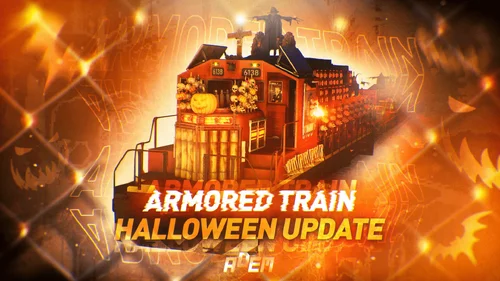
Halloween Update
Have you already prepared your server for Halloween?
On the eve of the Halloween Rust update, I have prepared for customization of all armored train cars.
After installing the update, customization will be automatically applied to all cars in the configuration of the armored train. To disable this, make the "Customization preset" parameter empty in the config.
Custom spawn points
If you are using a custom map in which there are no spawn trains on the surface, but there is a railway, then for the train to work on the surface, you need to add custom spawn points of the train.
Instruction:
Stand at the point where you want the train to spawn
Enter the command /atrainpoint
If you receive a message that a point has been created, enable “Use custom spawn coordinates [true/false]” in config
For correct operation, it is recommended to create several spawn points of the train
Chat commands (only for administrators)
/atrainstart– launches the event in a random configuration
/atrainstartunderground - forcibly launches an event underground
/atrainstartaboveground - forcibly launches an event aboveground
/atrainstart <trainPresetName> – launches the event in the <trainPresetName> configuration
/atrainstartunderground <trainPresetName>
/atrainstartaboveground <trainPresetName>
/atrainstop– stops the event
/atrainpoint– creates a custom spawn point of the train in your position
Console commands (RCON only)
atrainstart– launches the event in a random configuration
atrainstartunderground - forcibly launches an event underground
atrainstartaboveground - forcibly launches an event aboveground
atrainstart <trainPresetName> – launches the event in the <trainPresetName> configuration
atrainstartunderground <trainPresetName>
atrainstartaboveground <trainPresetName>
atrainstop – stops the event
Config
en – example of plugin configuration in English
ru – example of plugin configuration in Russian
Dependencies (optional, not required)
True PVE
PveMode
GUI Announcements
Notify
DiscordMessages
AlphaLoot
CustomLoot
Economics
Server Rewards
IQEconomic
Api
bool IsArmoredTrainActive()
bool StopArmoredTrain()
bool StartArmoredTrainEvent()
bool EndArmoredTrainEvent()
bool IsTrainBradley(uint netID)
bool IsTrainHeli(uint netID)
bool IsTrainCrate(uint netID)
bool IsTrainSamSite(uint netID)
bool IsTrainWagon(uint netID)
bool IsTrainTurret(uint netID)
Vector3 ArmoredTrainLocomotivePosition()
Hooks
OnArmoredTrainEventStart
OnArmoredTrainEventStop
-
Source Code | Issue Tracker | Legacy Version | Documentation | Metrics | Trello
Simple, efficient & automatic bounty system
Players can set bounties on other players using a command.
Once the bounty is set, anyone can kill the target to claim the reward.
Anyone may increase a player's current bounty.
Plugin commands all feature automatic tab completion.
Interactive Bounty Menu
Fully configurable items, lores, models, UI texture, tooltips
Support for custom fonts
Interactive Hunter & Bounty Leaderboard
Fully configurable items, lores, models, UI texture, tooltips
Support for custom fonts
Highly configurable
Player head drops
Run commands on different bounty events
Fully translatable (items & messages)
Configurable message & sounds
Much more..
Full MySQL and YAML support
Works all the way down to Java 11
Toggleable plugin logs so admins can keep track of anything that happens.
Options to fight bounty abuse
Minimum & maximum rewards
Taxes when creating and removing a bounty
Taxes can be redirected to a server/player account
Prevent players from claiming their own bounties
Cooldown on bounty placement & on player targeting
Level up Rewards
Players level up after claiming X bounties
Player titles, displayed on the leaderboard
Particle effects displayed when claiming a bounty
Features a tracking compass to hunt your targets down
Can be bought in the bounty menu
Displays a nice particle arrow towards your target
Automatic Bounties
A bounty will drop onto whoever kills someone illegally with no bounty
If the killer already has a bounty, its reward is increased
Open source & intuitive APIfor developers
Checks for updates and notify admins if required
Metrics
Advanced Bounty Claim Restrictions
Towny: cannot claim bounties from players in the same townBungeeFriends, PartyAndFriends: cannot claim bounties from friends
Bed Spawn Point Check: players with close bed spawn points cannot claim each other's bounties
Many useful PlaceholderAPI placeholders
Depends on Vault
Vault is not an economy plugin! A common installation issue
Make sure you download an economy plugin like CMI or EssentialsX
Supports Residence and WorldGuard flags
Disable bounty claims in specific regions
Disable bounty creation in specific regions
/addbounty <player> <bounty> sets a bounty on a player.
/bounties opens the bounties GUI.
/hunters opens the hunter leaderboard.
/bounties quotes lists all owned death quotes.
/bounties titles lists all owned hunter titles.
/bounties reload reloads the plugin.
/bounties help shows the help page.
/bounties remove <player> removes a player's bounty.
/bounties edit <player> edits a bounty.
bountyhunters.list gives access to the bounty list.
bountyhunters.add gives access to bounty placement.
bountyhunters.claim allows to claim bounties.
bountyhunters.remove allows to remove your bounties.
bountyhunters.leaderboard gives access to the hunter leaderboard.
bountyhunters.quote allows to use quotes.
bountyhunters.title allows to use titles.
bountyhunters.admin gives access to admin commands.
bountyhunters.immunity prevents other players from setting a bounty on you.
bountyhunters.immunity.bypass bypasses the immunity perm node.
bountyhunters.untargetable prevents other players from targeting you.
bountyhunters.untargetable.bypass bypasses the untrackable perm node.
bountyhunters.update-notify notifies you when logging in, when a new version is available.
-
FlameOrders
Donut-style buy orders for SMP and economy servers
Players create requests, reserve the payment, deliver matching items, and collect everything through clean inventory menus.
Bukkit • Spigot • Paper • Purpur • Folia • Minecraft 1.8.8+
What is FlameOrders?
FlameOrders is a buy-order marketplace for survival, SMP, economy, and Donut-style servers.
A buyer chooses an item, quantity, unit price, expiry, and matching rules. The total payment is reserved through Vault. Other players can then deliver valid items to the order. Sellers receive their payout, while the requested items are stored safely for the buyer to collect from the claim stash.
The workflow is menu-driven, searchable, configurable, Folia-aware, and suitable for both one-server setups and MySQL-backed networks.
Main Features
Buy-order marketplace — players request items instead of waiting for sellers to list them.
Full order editor — configure material, quantity, unit price, expiry, note, partial fills, minimum partial quantity, enchantments, and exact matching.
Public and personal views — the public browser shows other players' active orders by default; My Orders shows your own active and expired orders.
Advanced browser — text search, categories, vanilla/custom item scope, enchantment filter, expired-order filter, and minimum/maximum total price.
Eight sort modes — newest, oldest, most paid, most delivered, highest unit price, lowest unit price, most remaining, and expiring soon.
Safe fulfillment preview — accepted and rejected items are shown before submission; only accepted items are consumed.
Partial fills — allow full-only orders or define a minimum partial delivery amount.
Claim stash — purchased items and overflow deliveries remain stored until the receiving inventory has enough room.
Order lifecycle — open, partially filled, filled, cancelled, and expired states with version-safe mutations.
History, rankings, and audit tools — player history, top sellers, order timelines, and staff audit menus.
Item Matching and Fulfillment
FlameOrders does not match items by material name alone.
Vanilla material matching with optional exact metadata matching.
Required enchantments and levels through the order editor.
Custom item identities for ItemsAdder and Nexo.
EcoEnchants support for custom enchantment requirements.
Metadata-aware matching for names, lore, enchants, unbreakable state, leather colors, written books, fireworks, potions, and stored enchanted-book data.
Configurable scan modes — inventory only, hotbar only, or inventory/hotbar with shulker contents.
Optional shulker inspection limits and nested-container control.
Vanilla equivalence handling where supported by the fulfillment matcher.
Order owners cannot fulfill their own orders. Orders must still be active and unexpired when the fill is submitted.
Economy and Settlement Safety
Vault economy — the buyer's full order reserve is withdrawn when the order is created.
Seller payouts — successful deliveries create tracked money settlements.
Cancellation and expiry refunds — unused reserve is returned through the settlement system.
Offline payouts and refunds — enabled by default when the economy provider supports them.
Idempotent mutations — duplicate create, fill, cancel, claim, and admin operations are guarded at storage level.
Interaction locks — reduce duplicate-click and concurrent menu submission problems.
Claim-before-delivery checks — Collect All only removes entries that can fully fit in the player's inventory.
Menus and Customization
Orders browser and advanced filter menu.
Order detail, timeline, editor, material selector, and enchantment selector.
Fulfillment workspace with accepted/rejected preview.
Claim stash with pagination and Collect All.
Player history and top-fill rankings.
Admin audit browser and order action menu.
MiniMessage/Adventure titles, item names, lore, chat messages, sounds, and effects.
Bundled presentation presets: Default Clean, Donut V1, and Flame Donut.
Safe presentation reload without restarting the server.
Storage and Network Modes
SQLite — default local storage with no external database setup.
MySQL and MariaDB — shared SQL storage using HikariCP.
LOCAL — single-server SQLite mode.
MYSQL_TTL — MySQL/MariaDB with short-lived query caching and polling.
MYSQL_REDIS — Redis pub/sub and SQL outbox coordination for real-time multi-server cache invalidation.
Automatic schema management — idempotent table/index creation and legacy-state rebuilding.
Async database work — SQL operations run through dedicated executors instead of the server thread.
For MYSQL_REDIS, every server sharing the database must use the same Redis instance, channel, and sequence key. Mixed Redis and non-Redis nodes can desynchronize the shared order-view cache.
Integrations
Vault — required for live money operations with the default configuration.
PlaceholderAPI — player order and ranking statistics.
ItemsAdder — custom item identity matching and search tokens.
Nexo — custom item identity matching and search tokens.
EcoEnchants — strict custom enchantment matching.
Discord webhooks — created, filled, completed, cancelled, expired, and admin-action events.
Modrinth update checker — optional console and administrator notifications.
Commands
Main command aliases: /orders, /order, /market, /flameorders
/orders — open the orders browser.
/orders help — show command help.
/orders browse — open the public orders browser.
/orders search <query> — open the browser with a text search.
/orders my — open your own orders.
/orders create — open the order editor.
/orders create <quantity> <unitPrice> [expiryHours] — create directly from the item in your main hand.
/orders claim — open your claim stash.
/orders history [filled|claimed|cancelled|expired] — open filtered player history.
/orders top [cash|amount] — rank sellers by earned money or delivered quantity.
/orders preset list — list bundled and installed presentation presets.
/orders preset apply <id> — apply a preset and reload presentation files.
/orders admin — open the audit browser.
/orders admin audit — open the audit browser.
/orders admin reload — reload presets and presentation configuration.
/orders admin cancel <order-uuid> <reason...> — force-cancel the remaining order quantity.
/orders admin expire <order-uuid> <reason...> — expire an order immediately.
Quantity and price inputs accept normal numbers and the suffixes k, m, and b. Example: 64, 2.5k, 1m.
Permissions
flameorders.use — use the root command and marketplace. Default: true.
flameorders.create — create orders. Default: true.
flameorders.claim — declared claim-access node. Default: true.
flameorders.top — declared top-statistics node. Default: true.
flameorders.admin — full administration; grants audit and mutation children. Default: op.
flameorders.admin.audit — view administrative audit data and order details. Default: false.
flameorders.admin.mutate — reload presentation, apply presets, cancel orders, and expire orders. Default: false.
flameorders.limit.<number> — set a player's maximum active-order limit. The highest granted number wins.
flameorders.limit.unlimited — remove the active-order limit.
Operators and users with flameorders.admin receive an unlimited active-order limit. The current command routing uses flameorders.use as the effective root gate for /orders claim and /orders top; the dedicated claim/top nodes remain declared. Reload uses flameorders.admin.mutate—there is no separate flameorders.admin.reload permission in the current build.
PlaceholderAPI Placeholders
%flameorders_active_orders% — active orders created by the player.
%flameorders_claim_entries% — available claim-stash entries.
%flameorders_filled_quantity% — total quantity delivered by the player.
%flameorders_net_earned% — total net earnings.
%flameorders_top_cash_position% — cash leaderboard position, blank when unranked.
%flameorders_top_quantity_position% — quantity leaderboard position, blank when unranked.
Developer Events
FlameOrders exposes normal Bukkit events for custom integrations:
FlameOrderCreatedEvent
FlameOrderFilledEvent
FlameOrderCancelledEvent
FlameOrderClaimedEvent
FlameOrderExpiredEvent
FlameOrderAdminActionEvent
Important Setup Notes
Install Vault and a compatible economy provider before opening the marketplace to players.
SQLite is ready by default. Configure storage.yml for MySQL or MariaDB.
Use MYSQL_TTL for database-backed polling without Redis.
Use MYSQL_REDIS only when every connected server has matching Redis and database settings.
Hold the intended item before creating an order. The direct command always builds the matcher from the main-hand item.
Exact matching is stricter than material matching and may include item metadata and enchantment requirements.
By default, the public browser excludes the viewer's own orders and My Orders includes expired entries.
FAQ
What type of server is FlameOrders for?
Survival, economy, SMP, competitive SMP, and Donut-style servers where players need a structured item-demand marketplace.
Does it support Folia?
Yes. Player, region, global, and asynchronous work is routed through Bukkit/Paper/Folia scheduler bridges.
Does it require MySQL or Redis?
No. SQLite and LOCAL mode are the defaults. MySQL, MariaDB, and Redis are optional network features.
Can players order custom items?
Yes. ItemsAdder and Nexo identities are supported, with optional EcoEnchants matching.
Can menus and messages be changed?
Yes. Menus, item definitions, filters, messages, sounds, effects, and presentation presets are stored in editable YAML files.
Create demand. Deliver items. Trade faster.
Run a clean buy-order marketplace with FlameOrders. -
SMP Shards
Region-Based Shard Currency, AFK Rewards, Kill Rewards, Player Payments, 215 Bundled Shop Products, Leaderboards, SQLite/MySQL, and Folia Support
Create a complete progression currency for modern SMP servers. Reward players inside WorldGuard or SMP Regions zones, grant shards for PvP kills, apply permission-based bonuses, enable safe player payments, run a configurable multi-category shop, display cached leaderboards, expose PlaceholderAPI values, and persist every account asynchronously through SQLite or MySQL.
Paper • Purpur • Folia • Minecraft 1.21.4+ • Java 21
What is SMP Shards?
SMP Shards is a standalone progression-currency plugin designed for survival, Lifesteal, Box, PvP, economy, and competitive SMP servers.
Players can earn shards by remaining inside configured generation regions, defeating other players, receiving administrative rewards, or collecting payments from other players. They can then spend those shards through a configurable inventory shop containing normal Minecraft resources, equipment, special items, spawners, crate keys, and custom SMP weapons.
The plugin includes its own account system, SQLite and MySQL persistence, shop engine, leaderboard interface, AFK teleport flow, PlaceholderAPI expansion, MiniMessage presentation, configurable sounds, public API, and cancellable gain/loss events.
Vault is not required. The shard economy is independent, its gameplay modules can be enabled or disabled, and its currency names and balance model can be configured without replacing the server's normal money economy.
Built for Modern SMP Progression
Create a second progression currency — run shards beside an existing Vault economy without replacing normal money.
Reward controlled activity — grant shards inside selected WorldGuard or SMP Regions zones.
Reward competitive PvP — give configurable shard amounts for legitimate player kills.
Reduce kill farming — prevent repeated consecutive rewards from the same victim.
Scale rewards through permissions — ranks can receive the single highest configured generation or kill bonus.
Give players spending goals — use the bundled shop catalog or define your own products and prices.
Connect ArkFlame products — configure command delivery for SMP Spawners, SMP Crates, and SMP Weapons.
Encourage AFK-area usage — provide a movement-cancelled teleport countdown to the configured AFK destination.
Create visible competition — display cached shard rankings through a paginated player-head leaderboard.
Operate safely on Folia — player, global, and asynchronous work is routed through ownership-aware schedulers.
Core Features
Independent shard economy — no mandatory Vault dependency.
64-bit balances — shard accounts use Java long values.
Non-negative balance protection — accounts cannot intentionally persist negative balances.
Overflow-safe addition — additions use exact arithmetic instead of silently wrapping.
Atomic subtraction — concurrent balance deductions cannot overdraw the same account.
Custom currency naming — configure singular and plural currency names.
Compact number formatting — configurable decimals and suffixes such as K, M, B, T, and Q.
Region-based passive generation — players earn shards while remaining inside selected regions.
WorldGuard support — use existing WorldGuard region identifiers.
SMP Regions support — use ArkFlame SMP Regions through its public region API.
Composite AUTO mode — accept matching regions from either available provider.
Movement-query optimization — optionally recheck regions only when block coordinates change.
Configurable generation interval — control how frequently players earn shards.
Configurable base generation amount — define the normal reward per cycle.
Permission generation bonuses — configure any permission node and bonus value.
Highest-bonus resolution — overlapping rank permissions do not stack uncontrollably.
Zone entry presentation — configurable chat, title, subtitle, action bar, and sound feedback.
Live generation countdown — action bar timer shows the next reward time.
Player-kill rewards — reward killers with configurable shard amounts.
Kill permission bonuses — provide larger rewards to selected ranks.
Consecutive-victim anti-farm — repeated kills against the same victim can be ignored.
Cancellable gain events — other plugins can cancel or modify shard gains.
Cancellable loss events — other plugins can cancel or modify shard deductions.
Player payments — online players can transfer shards directly.
Payment rollback — failed receiver delivery restores the sender's debit.
Self-payment protection — players cannot transfer shards to themselves.
Multi-category inventory shop — browse products through configurable YAML menus.
215 bundled product definitions — ten categories are included.
167 normal Minecraft product definitions — blocks, resources, farming, weapons, armor, tools, and special items.
48 optional ecosystem product definitions — spawners, crate keys, and SMP weapons.
Configurable product prices — every listing controls its own shard cost.
Configurable product amounts — sell single items, bundles, equipment, or command-delivered products.
Configurable pages and slots — place each product exactly where it belongs.
Category permissions — restrict complete categories when required.
Unavailable-product filtering — products without a valid delivery route are hidden.
Inventory-capacity preflight — direct-item purchases can require enough storage before debit.
Command-delivery support — dispatch configured console commands for external products.
Alternative delivery branches — select the first available action using :R::.
Safe refund states — known pre-delivery failures can restore the debited shards.
Paginated leaderboard GUI — display cached rankings with player heads.
Asynchronous leaderboard refresh — rankings are queried away from player-owned execution.
Dynamic top placeholders — expose any cached rank through PlaceholderAPI.
Movement-cancelled AFK teleport — teleport only after the player remains within the configured threshold.
Asynchronous teleport completion — uses modern Paper teleport behavior.
SQLite persistence — works immediately without an external database.
MySQL persistence — configurable remote database and HikariCP pool.
Asynchronous database executor — JDBC account operations do not run on player threads.
Batched dirty-account flushing — changed balances are saved together at a configurable interval.
Final shutdown flush — loaded accounts are persisted before the repository closes.
MiniMessage support — gradients, hexadecimal colors, decorations, and modern components.
Legacy ampersand formatting — existing & color strings remain usable.
Configurable accent tag — change every <accent> component through one branding value.
Configurable sounds — generation, zone entry, kills, purchases, errors, and AFK actions.
PlaceholderAPI expansion — balances, ranks, generation timers, AFK state, and global settings.
Public read API — inspect accounts, balances, leaderboards, and feature state.
Safe YAML default merging — missing bundled keys are inserted without replacing existing values.
Atomic YAML writes — mutable configuration snapshots use temporary files and atomic moves where supported.
Asynchronous reload preparation — configuration and menu files reload away from player-owned operations.
Folia-native scheduling — global, player, and asynchronous work uses Paper's ownership schedulers.
Independent Shard Currency
SMP Shards stores one account per player UUID and keeps the player's last known username for administrative lookup and leaderboard display.
UUID identity — name changes do not create a second balance.
Last-known-name lookup — administrative commands can find persisted accounts by username.
64-bit balance range — supports large long-term economies.
Zero-floor protection — negative initial or assigned values are clamped to zero.
Exact overflow detection — invalid additions fail instead of corrupting the account.
Atomic compare-and-set deductions — simultaneous losses cannot spend the same shards twice.
Dirty-state tracking — only changed cached accounts enter normal periodic persistence batches.
Currency names are configurable:
Code:
currency: singular: "Shard" plural: "Shards"Number formatting is also configurable:
Code:
number-format: enabled: true decimals: 1 suffixes: ["", "K", "M", "B", "T", "Q"]This can render values such as 1.5K, 2M, or the exact raw amount when compact formatting is disabled.
Region-Based Passive Generation
Players can earn shards by remaining inside one of the configured generation regions.
Default behavior:
Reward interval — 15 seconds.
Base reward — 1 shard.
Generation regions — afk and afk_zone.
Permission bonus resolution — only the highest matching bonus is added.
Entry feedback — chat message, title, subtitle, and sound.
Countdown feedback — live action bar until the next reward.
Reward feedback — chat, title, subtitle, sound, and refreshed countdown.
Exit feedback — leave message and action-bar cleanup.
The effective reward formula is:
Code:
final reward = base amount + highest matching permission bonusConfigured bonuses are not all added together. A player holding multiple generation bonus permissions receives the single highest value, preventing accidental rank-stack inflation.
Default generation configuration:
Code:
interval-seconds: 15 base-amount: 1 permission-bonuses: smpshards.generation.extra_two: 2 smpshards.generation.extra_three: 3 presentation: enter-chat: true enter-title: true leave-chat: true reward-chat: true reward-title: true timer-action-bar: true enter-title-times: fade-in-ticks: 10 stay-ticks: 40 fade-out-ticks: 10 reward-title-times: fade-in-ticks: 5 stay-ticks: 25 fade-out-ticks: 5WorldGuard and SMP Regions Support
SMP Shards does not hard-depend on one region plugin. The provider mode determines where generation-zone matches are read from.
AUTO — query every available provider and accept a match from WorldGuard or SMP Regions.
WORLDGUARD — query only WorldGuard.
SMP_REGIONS — query only SMP Regions.
Default provider configuration:
Code:
region-provider: mode: AUTO generation-regions: - afk - afk_zone check-only-when-block-position-changes: trueProvider mode aliases are normalized, so values such as smp-regions, smp regions, and SMP_REGIONS resolve to the same mode.
Region names are compared case-insensitively. In AUTO mode, matching identifiers returned by either provider are combined into one effective region set.
Movement Query Optimization
Region membership normally only needs to change after crossing a block boundary.
With the default option enabled, head rotation and small movement inside the same block do not trigger another region-provider query.
Lower region-query frequency — yaw, pitch, and sub-block movement are ignored.
Immediate block transition checks — crossing X, Y, Z, world, or teleport boundaries refreshes state.
Per-player reward ticking — tracked generation state is evaluated on the player's entity scheduler.
One-second presentation cadence — timers remain readable without per-tick message spam.
Permission-Based Reward Bonuses
Generation and kill rewards have independent permission-bonus maps.
Example:
Code:
permission-bonuses: rank.vip: 2 rank.mvp: 5 rank.legend: 10A player with all three permissions receives only the highest bonus, 10. This makes the system compatible with inherited permission groups without multiplying every inherited reward.
Permission nodes and values are not hardcoded. Server owners can create any rank structure required by their network.
Player-Kill Rewards
When a player is killed by another player, the killer can receive a shard reward.
Configurable base amount — default 15 shards.
Configurable rank bonuses — add the highest matching kill bonus.
Real player killer required — environmental deaths do not create rewards.
Self-kill protection — a player cannot reward themselves.
Consecutive-victim protection — repeatedly killing the same player can stop producing rewards.
Different-victim reset — defeating another player changes the tracked victim for that killer.
Mutable gain event — integrations can change or cancel the final reward.
Configurable message and sound — successful rewards provide immediate feedback.
Default configuration:
Code:
kill-rewards: base-amount: 15 prevent-consecutive-same-victim: true permission-bonuses: smpshards.kill.extra_ten: 10 smpshards.kill.extra_twenty: 20Player-to-Player Payments
Players can transfer shards to another online player through /shards pay.
Positive whole amounts only — invalid or negative amounts are rejected.
Online exact-name target — payments resolve the current online player.
Self-payment denial — sender and receiver must be different players.
Balance verification — insufficient funds are rejected before receiver credit.
Loss event — the sender debit can be cancelled or adjusted.
Gain event — the receiver credit can be cancelled or adjusted.
Receiver-owned delivery — credit execution is routed through the target player's scheduler.
Automatic rollback — failed credit or scheduler rejection restores the sender's debited amount.
Separate sender and receiver messages — both players receive the applied transfer amount.
Configurable Multi-Category Shop
SMP Shards includes a YAML-driven inventory shop that can operate as a category selector or open one default category directly.
The bundled main menu contains ten category definitions:
Blocks — 24 products.
Resources — 24 products.
Farming — 24 products.
Weaponry — 24 products.
Armory — 26 products.
Tools — 22 products.
Special — 23 products.
Spawners — 20 optional SMP Spawners products.
Crate Keys — 7 optional SMP Crates products.
SMP Weapons — 21 optional SMP Weapons products.
Total bundled catalog definitions: 215.
Every category can configure:
Inventory title.
Inventory size.
Total page count.
Category permission.
Next-page item.
Previous-page item.
Back item.
Filler item.
Product page.
Product slot.
Product price.
Product amount.
Display material.
Display name.
Display lore.
Glow state.
Custom model data.
Spawner type metadata.
Direct-item or command-based delivery.
167 Bundled Minecraft Products
The normal catalog definitions cover building, farming, combat, progression, and end-game supplies.
Blocks — stone, cobblestone, wood planks, logs, glass, bricks, sandstone, Nether bricks, End stone, quartz, terracotta, obsidian, glowstone, sea lanterns, prismarine, and End stone bricks.
Resources — coal, iron, gold, copper, redstone, lapis, quartz, diamonds, emeralds, Netherite, amethyst, echo shards, prismarine materials, blaze rods, pearls, slime, magma cream, ghast tears, nautilus shells, Heart of the Sea, Nether Stars, and Totems of Undying.
Farming — crops, melons, sugar cane, cactus, bamboo, kelp, cocoa, Nether wart, chorus fruit, apples, golden carrots, bone meal, saplings, bee nests, honey blocks, sponges, eggs, and turtle eggs.
Weaponry — swords, bows, crossbows, arrows, spectral arrows, tipped arrows, maces, tridents, shields, axes, enchanted books, and End Crystals.
Armory — leather, chainmail, iron, gold, diamond, and Netherite armor pieces, Turtle Shells, and Elytra.
Tools — pickaxes, axes, shovels, and hoes across multiple material tiers.
Special — golden apples, enchanted golden apples, pearls, Eyes of Ender, experience bottles, saddles, name tags, leads, spyglasses, brushes, Elytra, fireworks, enchanted books, Shulker Shells, Dragon Heads, conduits, End Crystals, Respawn Anchors, lodestones, enchanting tables, and anvils.
Prices, quantities, pages, display names, and positions are fully editable. The bundled values are starting examples rather than a mandatory economy balance.
20 SMP Spawner Listings
The bundled SMP Spawners category contains:
Pig, Cow, Sheep, Chicken, Rabbit, Squid, Dolphin, Turtle, Wolf, Cat, Ocelot, Fox, Horse, Donkey, Llama, Mooshroom, Bee, Panda, Polar Bear, and Parrot spawners.
These products use command delivery and can be shown only when their configured integration route is available.
7 SMP Crate Key Listings
The bundled SMP Crates category contains:
Common, Uncommon, Rare, Epic, Legendary, Mythic, and Vote crate keys.
Each product can define its own shard price and external key identifier.
21 SMP Weapon Listings
The bundled SMP Weapons category contains:
Excalibur, Soul Reaper, Thunder Fury, Ice Breaker, Dragon Bow, Inferno Blade, Crystal Staff, Void Hammer, Shadow Dagger, Storm Bow, Titan Axe, Frost Sword, Phoenix Bow, Venom Strike, Thunder Axe, Light Sword, Earth Shaker, Wind Blade, Magma Staff, Celestial Blade, and Death Scythe.
Every listing can map its display icon to a separate external weapon identifier.
Shop Delivery Actions
Product delivery can use the following action types:
Code:
giveitem <id> [amount] run_command <command> smpcrates_givekey <id> [amount] smpspawners_givespawner <id> [amount] smpweapons_giveweapon <id> [amount]Multiple alternatives can be placed in priority order:
Code:
smpweapons_giveweapon excalibur 1 ::OR:: run_command give %player% diamond_sword 1The first currently available branch is selected.
Command templates support:
%player% — current username.
%uuid% — player UUID.
%product_id% — current shop product key.
%id% — action item or integration identifier.
%amount% — selected delivery amount.
Custom Item Registry
The included items.yml registry can define reusable products for giveitem delivery.
A registered item can configure:
Material.
Base amount.
Display name.
Lore.
Glow state.
Custom model data.
Spawner-type metadata.
The action amount acts as a multiplier. Large deliveries are split into legal Minecraft stack sizes and bounded to prevent unreasonable single-purchase output.
Example:
Code:
items: premium_token: material: AMETHYST_SHARD amount: 4 name: "<gradient:#7c3aed:#d946ef><bold>Premium Token</bold></gradient>" lore: - "<gray>A configurable SMP Shards shop item." glow: true custom-model-data: 1001Product delivery:
Code:
delivery: "giveitem premium_token 2"This delivers two registry batches, for a total of eight configured items.
Purchase Safety Flow
The shop separates product resolution, balance deduction, player-owned item delivery, global command dispatch, and refund handling.
Resolve a valid delivery branch — unavailable actions are ignored.
Preflight direct-item capacity — require enough inventory storage for the complete item delivery.
Check current shard balance — display both required and missing amounts when insufficient.
Fire the shard loss event — allow integrations to cancel or modify the effective price.
Debit the applied amount — only after validation succeeds.
Deliver direct items on player ownership — inventory changes remain entity-safe.
Dispatch commands on global ownership — console actions do not run from an arbitrary player thread.
Refund known safe failures — scheduler rejection, unavailable required plugin, or command dispatch returning false can restore the debit.
Surface unsafe partial states — partial item insertion or an external command exception is logged for staff review instead of pretending the transaction succeeded.
A console command that returns success but later fails internally inside another plugin cannot be automatically reversed. External command routes should be tested before public deployment.
Paginated Shard Leaderboard
Players can open a cached leaderboard showing the highest shard balances.
Player-head entries — each ranking uses the account owner's skull.
Formatted balances — leaderboard values use the configured number formatter.
45 display positions per page — default GUI layout uses slots 0 through 44.
Previous and next controls — navigate large ranking sets.
Configurable title and navigation — edit the leaderboard YAML without recompiling.
Asynchronous SQL ordering — results are loaded outside player-owned execution.
Deterministic ordering — balance descending, then last known name ascending.
Cached rank map — player-rank placeholders do not query the database per request.
Configurable cache size — default 250 entries.
Configurable refresh period — default 1,200 seconds.
Default leaderboard configuration:
Code:
leaderboard: refresh-seconds: 1200 cached-entries: 250AFK Teleport System
The /shardafk command starts a configurable countdown before teleporting the player to the stored AFK destination.
Configurable countdown — default 5 seconds.
Movement threshold — default 0.15 blocks from the original location.
World-change cancellation — changing worlds during the countdown cancels it.
Duplicate countdown protection — a player cannot start a second active countdown.
Chat countdown — optional per-second messages.
Action-bar countdown — optional clean timer display.
Countdown sound — configurable per second.
Movement cancellation feedback — clears the action bar and reports the reason.
Asynchronous teleport — uses teleportAsync and reports success or failure.
Persistent destination — /shards setafk writes world, coordinates, yaw, and pitch.
Atomic location save — AFK updates use the YAML snapshot save path.
Default configuration:
Code:
countdown-seconds: 5 movement-threshold: 0.15 presentation: chat-countdown: true action-bar-countdown: true location: {}SQLite and MySQL Persistence
SMP Shards supports local SQLite and remote MySQL through HikariCP.
Database table:
Code:
CREATE TABLE smp_shards_accounts ( uuid VARCHAR(36) PRIMARY KEY, last_name VARCHAR(16) NOT NULL, balance BIGINT NOT NULL DEFAULT 0 )Indexes are created for:
balance — leaderboard ordering.
last_name — administrative username lookup.
Persistence behavior:
Asynchronous account loading — player joins do not execute JDBC directly on entity ownership.
Asynchronous name lookup — offline administrative account searches use the repository executor.
Prepared statements — account and leaderboard queries use parameterized SQL.
Database-native upsert — MySQL and SQLite use their appropriate conflict syntax.
Transactional batch saves — dirty account snapshots commit together.
Retryable dirty state — failed periodic flushes re-mark affected accounts as dirty.
Cached online accounts — normal balance reads do not query SQL.
Final full flush — shutdown attempts to save every cached account before closing the pool.
Default SQLite configuration:
Code:
persistence: flush-interval-seconds: 5 type: SQLITE sqlite: file: shards.dbMySQL configuration:
Code:
persistence: type: MYSQL mysql: host: localhost port: 3306 database: smp_shards username: root password: "" use-ssl: false maximum-pool-size: 10 jdbc-url: ""A complete custom JDBC URL can be supplied through jdbc-url.
PlaceholderAPI Support
PlaceholderAPI is optional. When installed, the smpshards expansion registers automatically and remains persistent across PlaceholderAPI reloads.
Available placeholders:
Code:
%smpshards_balance% %smpshards_balance_raw% %smpshards_balance_formatted% %smpshards_currency_singular% %smpshards_currency_plural% %smpshards_accent_color% %smpshards_in_generation_region% %smpshards_generation_remaining_seconds% %smpshards_generation_remaining_formatted% %smpshards_generation_interval_seconds% %smpshards_generation_base_amount% %smpshards_generation_regions% %smpshards_afk_countdown_active% %smpshards_afk_countdown_remaining_seconds% %smpshards_afk_location_set% %smpshards_region_provider_mode% %smpshards_shop_enabled% %smpshards_leaderboard_position% %smpshards_player_rank% %smpshards_top_<rank>_name% %smpshards_top_<rank>_balance% %smpshards_top_<rank>_balance_formatted%Replace <rank> with a positive integer, for example:
Code:
%smpshards_top_1_name% %smpshards_top_1_balance_formatted%Player-specific placeholders use cached account, region, AFK, and leaderboard state. They do not perform a new SQL query for every placeholder request.
Public API and Events
Developers can obtain the enabled SMPShardsPlugin instance through Bukkit's plugin manager. The main plugin class implements SMPShardsApi directly.
The public API exposes:
Cached account lookup by UUID.
Asynchronous account lookup by last known name.
Cached balance lookup.
Asynchronous leaderboard query.
Feature-enabled lookup.
Two Bukkit events are included:
ShardGainEvent — cancellable and mutable.
ShardLoseEvent — cancellable and mutable.
Gain reasons:
Code:
REGION_GENERATION KILL ADMIN_GIVE PAYMENT_RECEIVED SHOP_PURCHASE OTHERLoss reasons:
Code:
SHOP_PURCHASE PAYMENT_SENT ADMIN_TAKE OTHERListeners can cancel a transaction or replace the requested amount before the account mutation is applied. Event amounts are clamped to non-negative values.
MiniMessage and Branding
SMP Shards uses Adventure components for messages, titles, subtitles, action bars, and menu text.
MiniMessage gradients — create modern branded headings.
Hexadecimal colors — use exact brand colors.
Decorations — bold, italic, underline, and other MiniMessage styling.
Legacy ampersand colors — lines containing & can use legacy formatting.
Central prefix placeholder — reuse %prefix% across messages.
Currency placeholders — use %currency_singular% and %currency_plural%.
Custom accent tag — every <accent> tag resolves to the configured brand color.
Default brand color:
Code:
accent: color: '#d946ef'Changing this value updates the custom <accent> tag used throughout messages and menus.
Configurable Sounds
Bundled sound keys include:
Generation reward.
Generation-zone entry.
UI click.
Error.
Purchase.
AFK countdown.
AFK teleport.
Kill reward.
Each sound can configure:
Code:
sound: ENTITY_PLAYER_LEVELUP volume: 1.0 pitch: 1.15Set a sound to NONE to disable it. Invalid sound names are reported once per key instead of repeatedly spamming the console.
Configuration Files
SMP Shards separates major systems into focused files:
Code:
plugins/SMPShards/ ├── config.yml ├── generation.yml ├── afk.yml ├── branding.yml ├── integrations.yml ├── messages.yml ├── sounds.yml ├── shop.yml ├── items.yml ├── shards.db ├── Categories/ │ ├── blocks.yml │ ├── resources.yml │ ├── farming.yml │ ├── weaponry.yml │ ├── armory.yml │ ├── tools.yml │ ├── special.yml │ ├── spawners.yml │ ├── crates.yml │ └── weapons.yml └── Gui/ └── Leaderboard.ymlFile responsibilities:
config.yml — currency, feature toggles, providers, kill rewards, leaderboard, persistence, and number formatting.
generation.yml — passive generation timing, bonuses, and presentation.
afk.yml — AFK countdown, movement threshold, presentation, and location.
branding.yml — custom MiniMessage accent color.
integrations.yml — optional command-delivery plugin names and templates.
messages.yml — all user-facing messages, titles, subtitles, and action bars.
sounds.yml — sound names, volume, and pitch.
shop.yml — root menu, category buttons, navigation, and shop behavior.
items.yml — reusable custom item definitions.
Categories/*.yml — category pages and product definitions.
Gui/Leaderboard.yml — leaderboard title, slots, player entries, and navigation.
Commands
Main command aliases: /smpshards, /shards, and /shard.
/shards — display the player and administrator help lines available to the sender.
/shards balance — display your current shard balance.
/shards bal — alias for balance.
/shards pay <player> <amount> — transfer shards to another online player.
/shards shop — open the shard shop.
/shards leaderboard — open the first leaderboard page.
/shards top — alias for leaderboard.
/shards see <player> — inspect a cached or persisted player's balance.
/shards set <player> <amount> — set a balance, including zero.
/shards give <player> <amount> — add shards.
/shards take <player> <amount> — remove shards without allowing an overdraft.
/shards setafk — save the current location as the AFK destination.
/shards reload — reload configurable runtime content.
/shardafk — begin the AFK teleport countdown.
/afk — AFK command alias.
/shardsafk — AFK command alias.
Tab completion includes main subcommands and online player names for payment and administrative target arguments.
SMP Shards starts without every optional integration installed.
WorldGuard — passive shard-generation region provider.
SMP Regions — ArkFlame region provider.
PlaceholderAPI — shard, rank, generation, AFK, and configuration placeholders.
SMP Crates — optional crate-key shop delivery.
SMP Spawners — optional spawner shop delivery.
SMP Weapons — optional custom-weapon shop delivery.
Region generation requires at least one selected and available region provider. The remaining economy, balance, payment, kill, AFK, database, and normal shop architecture can initialize without WorldGuard or SMP Regions.
Compatibility
Paper 1.21.4+ — primary supported platform.
Folia 1.21.4+ — fully supported platform.
Java 21 — required by the current build.
SQLite — bundled local persistence option.
MySQL — remote persistence option.
WorldGuard 7.x — optional provider integration.
PlaceholderAPI — optional expansion integration.
No mandatory Vault — shards remain an independent currency.
No mandatory database server — SQLite works locally.
SMP Shards uses modern Paper scheduler and teleport APIs. Bukkit, Spigot, Java 8, and Minecraft 1.8 are not supported by the attached 1.1.1 project.
Installation
Install Java 21.
Run Paper, Purpur, or Folia 1.21.4 or newer.
Place SMPShards-1.1.1.jar inside the server's plugins directory.
Install WorldGuard, SMP Regions, or both when using passive region generation.
Optionally install PlaceholderAPI and supported ArkFlame ecosystem plugins.
Start the server once to generate the configuration files.
Set region-provider.generation-regions to existing region identifiers.
Stand at the desired destination and execute /shards setafk.
Edit generation rewards, kill rewards, shop prices, messages, sounds, and database settings.
Restart the server or execute /shards reload.
-
Over the coming weeks, we'll be exploring a bunch of new features and improvements coming to our user interface including our brand new theme editor, a new mobile UI, dark mode and performance improvements thanks to a reduction in both JavaScript and CSS. To kick off this series, let’s take a closer look at the new sidebar layout and new view modes for the forum index and topic pages.
Sidebar Layout
Traditionally, Invision Community has shipped with a horizontal header and navigation bar at the top of the page, which is still available in version 5. We're introducing a brand new (and optional) sidebar layout, which can be enabled or disabled easily from within your theme settings. The sidebar not only provides convenient access to your applications, activity streams and search bar, but you can now add links to nodes for even easier access to popular or commonly used areas of your community. For example - a category from your forum, an album from the Gallery, or a product group from Commerce.
Forum Index: Feed view
One of our goals for version 5 was to re-imagine new ways for your visitors to consume content, and the sidebar layout is just one of our solutions. Table view has been the typical way of displaying forums, providing visitors with a simple summary of the most recently active topic. Grid mode introduced cover photos to forums and is a great way to make your page more visually engaging, while fluid view allows visitors to filter through a list of topics to easily focus on multiple areas of the community.
Joining these view modes in version 5 is our new Feed view. Optional cover photos and featured forum colours allow you to personalise each forum, and a list of recently active topics with snippets of the most recent reply allow you to easily see what each forum is focusing on at a glance. The topic list drops below the cover photo and converts to a scrollable list on small devices. It's our fresh take on content display, and we can’t wait to hear your feedback!
Topic pages: Compact view
In addition, Invision Community 5 also introduces a new, compact layout option for topics. We wanted to create a layout which placed focus on your content while still keeping all of the authors profile information easily accessible within a mini profile. Stats, rank, badges, reputation points and more can be found by tapping the icon at the top of every post. The mini profile strip has also been added to other areas of the software too, such as comments and reviews in applications like Gallery and Blogs, and will appear on the mobile layout when the traditional "table view" is used in topics.
Switching between the new compact view and the author sidebar view takes just seconds giving you complete control over your community.
As part of this view, you also have the choice to feature/pin the original post to the top of every page, making it a breeze for your visitors to easily understand the context of replies without navigating back to page 1. Pinned posts have a slightly larger font-size to distinguish them from replies, and we've thoughtfully truncated them on pages beyond the first to keep scrolling to a minimum.
The new sidebar layout and view modes offer a fresh and innovative approach to navigating and interacting with your community. We’re really keen to hear your thoughts on these new views and whether you’ll be unleashing them on your own sites! We appreciate that no two sites are the same, and those who are a fan of the classic header look will benefit from quick styling tools and a visual way to re-arrange the header elements which we’ll cover in a later blog.
We’re looking forward to showcasing a whole bunch of new features over the coming weeks - so stay tuned, and we’ll see you then! -
PLEASE FULLY READ THE RESOURCE OVERVIEW BEFORE PURCHASING THE PLUGIN. IF YOU HAVE ANY QUESTIONS, OPEN A SUPPORT TICKET IN OUR DISCORD OR SEND ME A PM ON SPIGOT. PLEASE DO NOT PURCHASE THE PLUGIN WITHOUT HAVING FULLY READ THE PLUGIN PAGE.
By purchasing Vulcan, you agree that you have read the resource overview in full, have acknowledged and accepted the terms and conditions of use, and have taken notice of all disclaimers, compatibilities, and incompatibilities mentioned.
YOU MUST INSTALL PACKETEVENTS AS A PLUGIN IN ORDER FOR VULCAN TO WORK. IT WILL NOT WORK WITHOUT PACKETEVENTS IN YOUR PLUGIN FOLDER!!! YOU CAN DOWNLOAD IT HERE: https://www.spigotmc.org/resources/packetevents-api.80279/
Vulcan is an advanced cheat detection system that operates at the packet level with version support for 1.7 all the way to 1.21.3.
By default, Vulcan acts silently and does not 'prevent' the player from cheating, but simply observes their actions and flags for things out of the vanilla boundaries (through the configuration certain checks are able to be turned to 'setback' to actively prevent players from cheating)
Why Vulcan?
Support
Support tickets are responded to in minutes (mostly instantly) as long as a staff member is awake. We have staff members in all time zones, ensuring that there is always someone who can help you. Unlike competitors, there is no need to deal with an annoying bot or pay additional fees to access support!
Customization
Vulcan has the most extensive configuration file and API of any anti-cheat on this website and others. Practically every part of Vulcan is configurable, so you can set it up exactly how you want. Our full configuration file can be viewed here.
Simple
No need to spend money on a fancy configuration or an additional addon; Vulcan simply works as-is. Just drag and drop it into your plugins folder.
Features
Vulcan has a wide range of features to help quickly identify and remove cheaters from your server.
Client Brand Alerts:
When a player joins the server, they send special messages through plugin channels with the 'brand' of their client.
Spoiler: Note
Full Alert Customization:
Vulcan allows you to fully customize its alert messages. By default, all sorts of useful information are displayed to staff, such as the player's ping, the server's TPS, the player's client version, a description of the check, and all of the details associated with the flag, with even more placeholders available to you. You are also able to color code your alerts based on how many violations the player has set off!
Advanced Violation and Punishment Logs:
Vulcan's advanced logging system keeps track of all violations and punishments on your server in an easy-to-understand way, while also providing you with plenty of useful information.
Spoiler: Violation Logging
Spoiler: Punishment Logging
Judgment Days
Vulcan's Judgment Day feature allows you to ban players in waves!
Asynchronous
Almost all of Vulcan is run on a separate thread, ensuring that your server's performance is kept at its peak.
Extensive Configuration
Almost every aspect of Vulcan is configurable, down to the sensitivity and values around each check.
Spoiler: Example Check Configuration
Discord Integration
Vulcan has built-in compatibility to send its alerts and punishments to a configurable discord channel!
Compatability
Vulcan is compatible with any server version between 1.7 and 1.20.6. We only guarantee full functionality on the following Spigots/forks: Spigot, PaperSpigot, Tuinity, and Purpur. This is not to say that Vulcan will not work on anything except these Spigots, however, they are the only ones in which functionality is 100% guaranteed without any issues.
Known Incompatible Spigots:
- CatServer
- SpigotX (and all of its forks)
- SmokSpigot
- FoxSpigot (and a lot of other Scalebound forks that unnecessarily change/move default methods/packages)
If you are unsure as to whether or not Vulcan will work on your particular Spigot, please try using Medusa first as both plugins use the same API for listening to packets: Medusa's Plugin Page
Due to how Vulcan injects into the player's pipeline, some plugins may also cause issues and may not allow for Vulcan to properly inject and listen to the packets sent and received by the player.
May Result in Incompatibilities:
- FastLogin (in some cases)
- Denizen (breaks channeling for some unknown reason)
- SlimeWorldManager
Miscellaneous Incompatibilities:
- Butterfly/Drag Clicking, as well as any other irregular form of clicking or mouse modification. (This includes binding the swing or place keys to anything that is not a left or right-click. We have absolutely no way to distinguish someone who is auto-clicking 35 clicks per second or someone who has bound their attack key to the space bar. Either tell your players not to do this, or disable the auto-clicker checks)
- Non-vanilla movement mechanics
- Client-sided blocks
- Clumsy/any other irregular packet modification
- Attribute modifiers (in versions under 1.13)
- Potion effect/amplifiers/enchantments out of the vanilla limits
- Any non-vanilla client (especially Lunar Client/BlazingPack)
Spoiler: Non-Vanilla Clients
GeyserMC - Vulcan automatically hooks into Floodgate and identifies Bedrock players and does not flag them (BEDROCK PLAYERS ARE TOTALLY IGNORED). GEYSER SUPPORT/EXEMPTION REQUIRES FLOODGATE-BUKKIT OR ELSE WE HAVE NO WAY OF RESOLVING WHETHER OR NOT A PLAYER IS CONNECTED THROUGH GEYSER. IF YOU ARE ON BUNGEE, YOU NEED TO DO THIS IN ORDER FOR GEYSER SUPPORT TO WORK: https://github.com/GeyserMC/Geyser/wiki/Floodgate
For any questions about any incompatibilities or incompatibilities, please PM me on Spigot or join our Discord.
Disclaimers
As with every anti-cheat, there is always the possibility for false positives and bypasses, and Vulcan is no exception. If you experience either of these, please open a ticket with us in our Discord to address your concerns. With that being said, before purchasing Vulcan, please understand Vulcan's purpose. It is designed to detect blatant cheaters who use common and publicly available hacked clients. If you are looking for an anti-cheat that flags people using Vape's Aim Assist, 3.01 reach, 1% speed modification, and .0001 hitbox expansion, then you are in the wrong place. We like to be as transparent as possible with our users, so here is a list of disclaimers and things that we ask you to acknowledge and keep in mind before purchasing Vulcan.
Spoiler: Some things that Vulcan does NOT detect/have checks for
Disclaimers
Checks
The following is a full list of Vulcan's checks.
Combat:
- Aim: A, B, C, D, E, F, G, H, I, J, K, L, M, N, O, P, Q, R, S, T
- Auto Block: A, B, C
- Auto Clicker: A, B, C, D, E, F, G, H, I, J, K, L, M, N, O, P, Q, R, S, T
- Criticals: A, B
- Hitbox: A, B
- Kill Aura: A, B, C, D, E, F, G, H, I
- Reach: A, B (~3.15 Reach)
- Velocity: A, B, C (~99% Vertical, ~70% Horizontal)
Movement:
- Boat Fly: A, B
- EntitySpeed: A
- Elytra: A
- Fast Climb: A
- Flight: A, B, C, D, E
- Jesus: A, B, C, D, E
- Jump: A, B
- Motion: A, B, C, D, E, F, G
- No Slow: A, B, C
- Speed: A, B, C, D
- Sprint: A, B, C, D
- Step: A, B, C
- Strafe: A, B
- Wall Climb: A
Player:
- Bad Packets: A, B, C, D, E, F, G, H, I, J, K, L, M, N, O, P, Q, R, S, T, U, V, W, X, Y
- Baritone: A, B
- Crash: A, B, C
- Fast Break: A
- Fast Place: A
- Fast Use: A
- Ground Spoof: A, B, C
- Hacked Client: A
- Improbable: A, B, C, D
- Invalid: A, B, C, D, E, F
- Inventory: A, B
- Ping Spoof: A, B, C
- Scaffold: A, B, C, D, E, F, G, H, I, J, K, L
- Timer: A, B
- Tower: A
Installation
Download Vulcan.
Place into your plugins folder.
Restart the server.
Vulcan is not compatible with /reload or PlugMan (/plugman reload | /plugman load) - these will cause errors. Please restart the server, or use the /vulcan reload command.
Any check marked with a * in game is EXPERIMENTAL, meaning you SHOULD NOT PUNISH FOR THEM. They are not yet fully stable and still in development
Every server is different, and some may require different configurations. Vulcan is made in a way that allows you to modify the sensitivity and values for almost every single check - please make use of this for your server.
For example, if you're running a KitPvP server, you can probably disable the Fast Break and Baritone checks, as they aren't necessary at all in that game mode. Gamemodes that run for a shorter duration of time such as SkyWars or Bedwars may benefit from lowering the max-violations for some checks in order to punish players more quickly.
Commands and Permissions
Vulcan has a large array of commands that make identifying and removing cheaters from your server easier.
/alerts | vulcan.alerts | Toggles on and off Vulcan's alerts.
/verbose | vulcan.verbose | Toggles on and off Vulcan's verbose messages.
/jday add (player) | vulcan.jday | Adds a player to Judgement Day.
/jday execute | vulcan.jday | Executes Judgement Day.
/logs (player) (page) | vulcan.logs | Read a player's logs from the violations file.
/punishlogs (player) | vulcan.punishlogs | Check a player's punishment from the punishments.txt file
/vulcan help | vulcan.help | Shows Vulcan's help command.
/vulcan reload | vulcan.reload | Reloads Vulcan's configuration file.
/vulcan disablecheck (checkname) | vulcan.disablecheck | Disable a check from running
/vulcan freeze (player) | vulcan.freeze | Freeze a player, making them unallowed to move.
/vulcan ban (player) | vulcan.ban | Bans a player through Vulcan.
/vulcan violations (player) | vulcan.violations | See all violations flagged by a player.
/vulcan cps (player) | vulcan.cps | Display a player's CPS.
/vulcan knockback (player) - /vulcan kb (player) | vulcan.knockback - vulcan.kb (player) | Test a player for anti-knockback
/vulcan checks | vulcan.checks | Display all of Vulcan's checks
/vulcan reset | vulcan.reset | Reset violations of all online players.
/vulcan clickalert (player) | vulcan.clickalert | Custom lists of commands to be executed when clicking an alert message
/vulcan top | vulcan.top | Shows list of users with the highest violations
vulcan.bypass.(checkname) - bypasses the specific check
vulcan.bypass.* - bypass all checks
/vulcan connection (player) | vulcan.connection | Shows connection information related to a player.
/vulcan profile (player) | vulcan.profile | Show's a players Vulcan profile, including sensitivity, and other useful information.
PlaceholderAPI Placeholders
%vulcan_client_brand% - Display the user's client brand
%vulcan_total_violations% - Display the user's total violations
%vulcan_combat_violations% - Display the user's combat violations
%vulcan_movement_violations% - Display the user's movement violations
%vulcan_player_violations% - Display the user's player violations
%vulcan_total_punishments% - Display the total punishments executed by Vulcan -
About Kong: Skull Island
A stunning island full of dangers and fantastic places. The map was created based on the movie Kong: Skull Island.
Immerse yourself in the world of Skull Island and feel like a hero of a movie of an entire era about an amazing big, kind and strong monkey named Kong.
Map size 4096.
The terrain of the map was repeated along the coastline from the movie poster. Created with World Creator.
And also the map is ideal for pvp and pve servers.
Have questions? See the FAQ (Read me) file.
Need help? Connect to our discord: click me
This map is constantly supported and updated for the current version of the game with all updates!
Features:
About 67409 prefabs
Map size 4096
Optimal FPS
9 custom locations with loot
Over 21 custom locations for building
Over 5 new unique building locations
Сustom locations where you can build are marked with "X”
All custom locations have names on the map
Compatible with Raidable Bases plugin
Custom configuration of BetterNpc for the map is set up
Custom monuments:
Lake Hank Marlowe (large location)
Shrine of reflection (large location)
Big Camp (large location)
Tribal Village (medium location)
King Kong Tomb (medium location)
Fantasy Forest (medium location - loot + build)
King Kong Swamp (medium location - loot + build)
Volcano (medium location)
Custom Mining outpost (small location + build)
And many others that don't have a name
5 unique types of places to build
Over 21 custom locations for building
Monuments:
Ferry Terminal
Nuclear Missile Silo
Arctic Research Base
Abandoned Military Base
Harbor
Giant Excavator
Lighthouse
Large Fishing Village
Fishing Village
Small Fishing Village
OilRig Small
OilRig Large
Train Tunnel
Underwater Labs
Launch Site
Ranch
Outpost
Military tunnel
Power Plant
Bandit camp
Satellite Dish
Sphere
Junkyard
Metro
Mining outpost
Gas station
Supermarket
Oxide.Ext.RustEdit.dll FAQ (Read me).txt -
Works with
Compatible add-ons, packages, or tools that pair well with this resource.
Simple Loot TableOptional
NotifyOptional
KitsOptional
NTeleportationOptional
ClansOptional
Show More (2)
About Airfield Event
Adds an airfield event to your server! A cargo plane lands on the airfield and drops airdrops, boxes. Strong NPCs, Bradley and a patrol helicopter will protect the crates
You can also set up custom loot using the "SimpleLootTable" plugin
Features:
Easy to set up. Excellent customization options in the config
Commands(admin only):
afestart - force the event to start
afestart {steamID/name} - the event will be reserved for one player
afefast - quick landing of a cargo plane, for testing settings
afefast {steamID/name} - quick landing of a cargo plane, the event will be reserved for one player
afestop - cause the event to end
afe_addcustom - adds a custom landing place for a cargo plane. You must stand on level ground and look in the direction where the cargo plane will move(do not forget to set in the config file "Use a custom place to land a cargo plane": true)
Hooks:
void AirfieldEventStarted() - called when the event starts
void AirfieldEventEnded() - called when the event has ended
AirfieldEventWinner(BasePlayer player) - called at the end of the event, returns the event winner
AirfieldEvent config:
{ "PVE mode (crates can only be looted by the player who first dealt damage to the NPC)": false, "Time after which the owner of the event will be deleted if he left the dome or left the server (for PVE mode)": 300, "Give event ownership to the owner's teammates if he is no longer the owner. Only if teammates are within the event radius (for PVE mode)": true, "Radius for event(for PVE mode)": 380, "Create a dome for PVE mode": false, "Dome transparency (the higher the value, the darker the dome, recommended 4)": 4, "Dome offset": { "x": 0.0, "y": 0.0, "z": 30.0 }, "Do not allow other players into the event(only for PVE mode if there is a dome)": false, "Allow admin to be in event dome (only for PVE mode if there is a dome)": true, "Triggering an event by timer (disable if you want to trigger the event only manually)": true, "Minimum time to event start(in seconds)": 3600, "Maximum time to event start(in seconds)": 7200, "Event duration(In seconds. Time is calculated from the moment the cargo is dropped by the plane at the airfield)": 3600, "End the event early if all crates were completely looted and all NPCs were killed(including Bradley and Heli)": true, "Minimum number of online players to trigger an event": 1, "Minimum drops amount(minimum number of cargo spawns after plane landing, should not be less than 1)": 2, "Maximum drops amount(maximum number of cargo spawns after plane landing, should not be less than 1, maximum 10)": 4, "Minimum crates amount(spawn every cargo drop)": 1, "Maximum crates amount(spawn every cargo drop)": 1, "Crate simple loot table name(plugin SimpleLootTable is required)": "", "Minimum number of items in a crate(plugin SimpleLootTable is required)": 0, "Maximum number of items in a crate(plugin SimpleLootTable is required)": 0, "Remove crates after being looted by a player(in seconds)": 300, "Extend event duration if NPCs, Heli or Bradley is attacked (if less time left, extend to set time (in seconds))": 600, "Crates timer(in seconds)": 900, "Minimum airdrops amount(spawn every cargo drop)": 1, "Maximum airdrops amount(spawn every cargo drop)": 1, "Airdrop simple loot table name(plugin SimpleLootTable is required)": "", "Minimum number of items in an airdrop(plugin SimpleLootTable is required)": 0, "Maximum number of items in an airdrop(plugin SimpleLootTable is required)": 0, "Minimum NPCs amount(spawn every cargo drop)": 1, "Maximum NPCs amount(spawn every cargo drop)": 2, "NPCs type(NPCs prefab, experimental setting, it is not known how the NPCs will behave) 0 - tunneldweller; 1 - underwaterdweller; 2 - excavator; 3 - full_any; 4 - lr300; 5 - mp5; 6 - pistol; 7 - shotgun; 8 - heavy; 9 - junkpile_pistol; 10 - oilrig; 11 - patrol; 12 - peacekeeper; 13 - roam; 14 - roamtethered; 15 - bandit_guard; 16 - cargo; 17 - cargo_turret_any; 18 - cargo_turret_lr300; 19 - ch47_gunner": 8, "NPCs health(0 - default)": 0, "NPCs damage multiplier": 1.0, "NPCs accuracy(the lower the value, the more accurate, 0 - maximum accuracy)": 2.0, "NPCs attack range": 75.0, "Radius of chasing the player(NPCs will chase the player as soon as he comes closer than the specified radius, must be no greater than the attack range)": 60.0, "Minimum distance to NPC damage": 75.0, "Forcibly immobilize an NPC": false, "Method of distribution of kits for NPCs(1 - sequentially, 2 - repeating, 3 - randomly)": 1, "List of kits for NPC(requires Kits plugin)": [ "kit1", "kit2", "kit3" ], "Default displayName for NPC(for SimpleKillFeed/DeathNotes plugin)": "Airfield NPC", "List of displayNames for each NPC(for SimpleKillFeed/DeathNotes plugin)": [ "Airfield NPC1", "Airfield NPC2", "Airfield NPC3" ], "Chance of an NPC throwing a grenade(0-100%) Only if the NPC loses sight of the player, if the player is in a vehicle, if the player is trying to search crates": 50, "NPC grenade damage scale": 1.0, "Will the NPC take damage from a collision with a car": true, "Will NPCs attack zombies": true, "Remove NPC corpses": false, "Patrol helicopter spawn chance (0 - 100%)": 50, "Call the helicopter only after activating the hackable crate": false, "How long the helicopter will patrol the airfield (in minutes)": 5, "Helicopter damage multiplier": 1.0, "Helicopter health": 10000.0, "Helicopter main rotor health": 900.0, "Helicopter tail rotor health": 500.0, "The patrol helicopter will not patrol the airfield if it has found a target": true, "Spawns a helicopter right on the airfield(if false, then the helicopter will arrive from afar in a few seconds)": false, "Helicopter patrol range": 150, "Event marker on the map(will spawn a marker immediately after the start of the event)": false, "If true, spawn the marker only after the plane lands": true, "Event marker name": "Airfield event", "Display on the marker how much time is left until the end of the event": true, "Event marker transparency(0-1)": 0.75, "Event marker radius": 0.5, "Event marker color.R(0-1)": 1.0, "Event marker color.G(0-1)": 0.0, "Event marker color.B(0-1)": 0.0, "Use a custom place to land a cargo plane": false, "Custom place position": { "x": 0.0, "y": 0.0, "z": 0.0 }, "Custom place rotation": { "x": 0.0, "y": 0.0, "z": 0.0 }, "Use custom navmesh (enable if using custom airfield and getting NPC navmesh error)": false, "BradleyAPC spawn chance (0 - 100%) If you are not using a custom map, correct operation of BradleyAPC is not guaranteed. Use the default airfield or a landing spot that is similar to the default airfield": 50, "BradleyAPC bullet damage": 7.0, "BradleyAPC health": 1000.0, "Notification type for the Notify plugin (-1 does not use Notify)": -1, "Notice message type (0 or 1, -1 do not use notice messages)": -1, "SteamID for chat message icon": 0, "Number of points for the winner(only for ServerRewards plugin)": 0, "Number of skill points for the winner(only for Skill Tree plugin)": 0, "Drone Ban Radius (0 - not used)": 0.0, "Damage drones take when near an event(every 5 seconds)": 50.0 } -
depends on
Required files or plugins needed for this resource to work properly.
Npc SpawnRequired
About Harbor Event
Creates a unique event at the Harbor monument for players to participate in for rewards. Players must battle numerous NPCs and APCs to access the puzzle to open the loot room!
Description
This event started off as a warning on the chatbox about the ships coming soon to dock in Port, loaded with precious cargo. After the period has passed, a ship appears in one of the locations at Harbour that are accessible from the map, where the crane loads the container.
The loading area is protected by one Tank and 7 NPCs by default. The container door is locked, you must push a button from inside the cranes cockpit to open the door. Inside the container, there is a default security camera, locked box, 2 DMS, 2 Elite, and 2 Military boxes.
The locations and loot from all crates/NPCs can be configured within configurations, and unwanted crates/NPCs added or removed. Also, ships will generate the default ship loot, e.g. The config file allows to modify tank as well as loot inside of the ship.
When the event occurs, the map displays the markers (configured in the config file). All players that are inside the event area will have a timer counting down the amount of time until the event ends.
Dependencies Required
NpcSpawn
Dependencies (optional, not required)
True PVE
PveMode
GUI Announcements
Notify
Discord Messages
AlphaLoot
CustomLoot
NTeleportation
HeliControl
Economics
Server Rewards
IQEconomic
Kits
Chat commands (only for administrators)
/harborstart – starting of the event
/harborstop – ending of the event
/harborpos – determining the position and rotation coordinates for changing the location of NPCs and crates.It should write in the configuration (Attention! The event must be started, the current position of the administrator in relation to the cargoship is read)
Console commands (RCON only)
harborstart – starting of the event
harborstop – ending of the event
Plugin Config
en - example of plugin configuration in English
ru - example of plugin configuration in Russian
Hooks
void OnHarborEventStart() – called when the event starts
void OnHarborEventEnd() – called when the event ends
void OnHarborEventWinner(ulong winnerId) – called at the end of the event, where the winnerId is the player who did more actions to complete the event